For anyone who's bought more courses than they've finished

All your courses.
One private library.

Stop losing track of what you paid for. Organize every course you've bought — from any platform — into one clean dashboard with real progress tracking, notes, and links. $12, once, yours forever.

Get My Course Library — $12 →
One-time payment · No subscription · No account needed
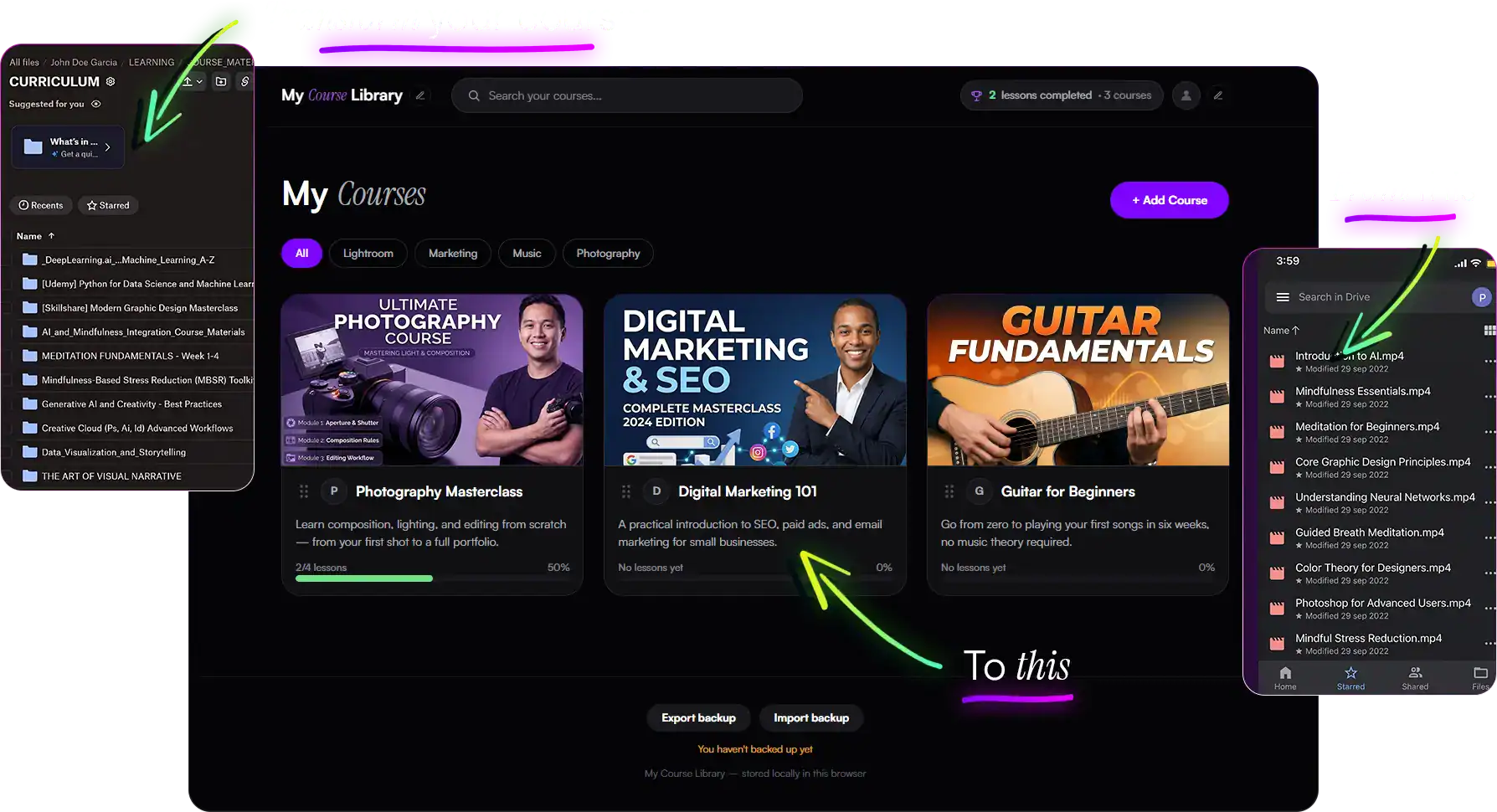
My Course Library home page showing organized courses with progress bars
100% private — nothing leaves your browser
$12 one time, not a subscription
Works best with Dropbox links
No account or sign-up required
The Problem

You didn't stop learning.
You just lost track.

A course on Skool. A bundle from Gumroad. A bookmark you swore you'd get back to. Sound familiar?

✕ Without a library
  • Courses scattered across five different platforms
  • No idea what you've actually finished
  • Notes buried in a random Google Doc, or nowhere
  • You paid for it, then forgot it existed
✓ With My Course Library
  • Every course, one private page, organized by you
  • A progress bar for every course and module
  • Notes and links attached to the exact lesson
  • A "continue watching" shortcut back to where you left off
What You Get

Everything you need. Nothing you don't.

📚

Organize everything

Courses, modules, and lessons — mirror the structure of any course you've bought, from any platform.

📈

Track real progress

Check off lessons as you finish them and watch progress bars fill in, per module and per course.

📝

Notes & links, in place

Jot notes under every lesson and save resource links — PDFs, worksheets, cheat sheets — right where you need them.

🔒

100% private

Everything lives in your browser. No account, no server, nobody else ever sees your library.

🌓

Light or dark

Switch between light and dark mode with one click, whatever's easier on your eyes. Your choice is remembered.

🎨

Make it yours

Add your own logo and profile photo. It's your library, not a generic template.

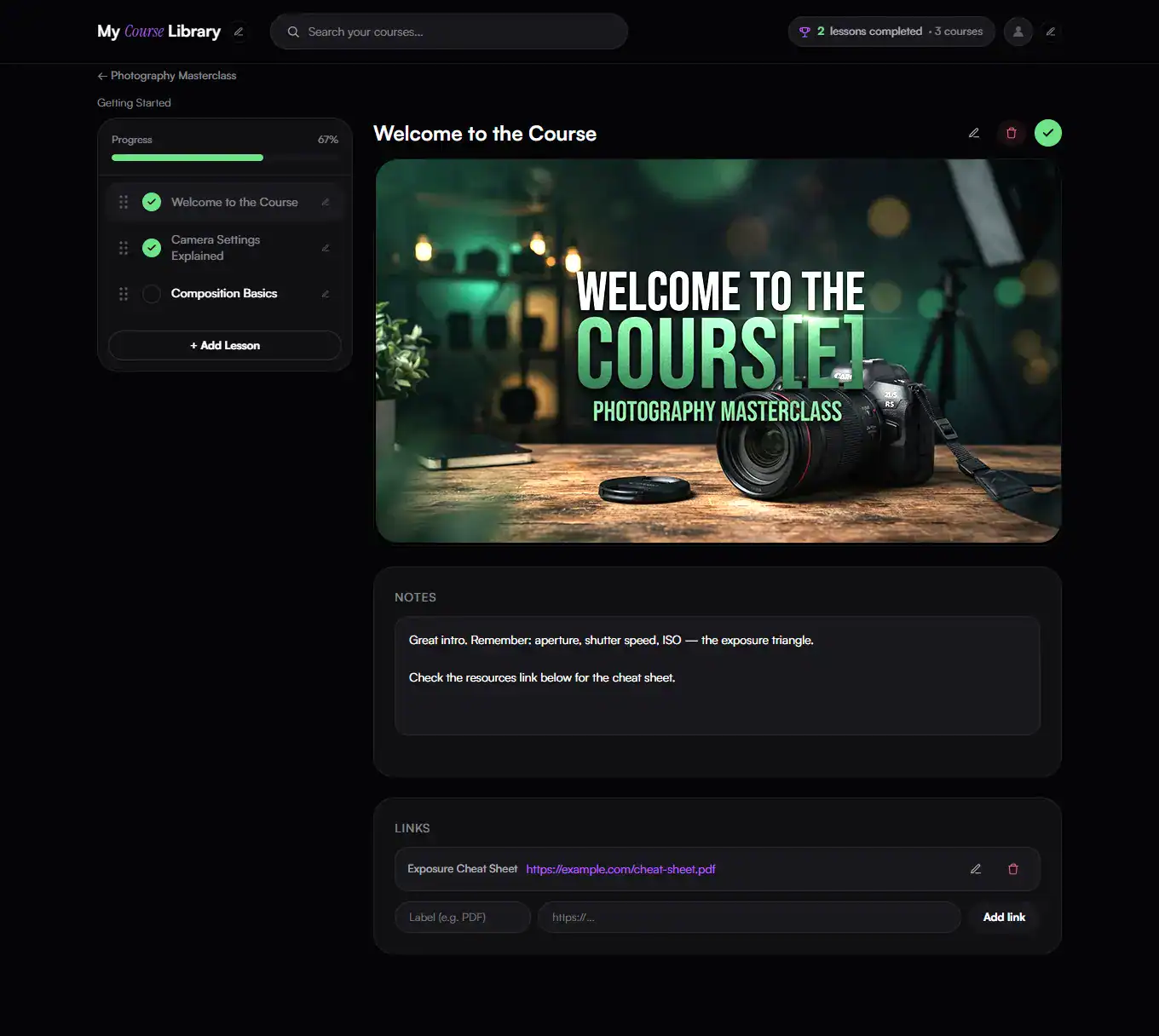
Lesson view with video, notes, and links
Every Lesson

Video, notes, and links — together

No more switching between five tabs to find the cheat sheet you saved somewhere. Everything for a lesson lives in one place.

  • Paste a Dropbox link — it just plays
  • Click into Notes and type — links you paste become clickable automatically
  • One click marks a lesson watched and updates every progress bar
See It In Action

Watch the full walkthrough

Two and a half minutes, start to finish — see exactly how it works before you buy.

How It Works

Three minutes to your first course

1

Add your course

Title, cover image, category — takes seconds. Works for anything you've bought, anywhere.

2

Break it into lessons

Mirror how the course is actually organized — modules, then lessons, each with its own video link.

3

Check things off

Watch, take notes, mark it done. Your progress bars — and your "continue watching" shortcut — update instantly.

Pricing

One price. Yours forever.

No subscription, no upsells, no "starter tier." Pay once, use it for every course you ever buy again.

ONE-TIME PAYMENT
$12
one time · no subscription
  • Unlimited courses, modules, and lessons
  • Progress tracking & "continue watching"
  • Notes, links, drag-and-drop reordering
  • Your own logo & photo, fully customizable
  • Light or dark mode, your choice
  • Export/import backups — your data, portable
  • Step-by-step PDF guide included
  • Yours forever — no recurring fees, ever
Get Instant Access — $12 →
No installer, no .exe — just a webpage that runs offline. Safe to open, safe to inspect.
Secure checkout · Instant download
Where your video links actually work
Dropbox links — work reliably in any modern browser, no conditions.
!
Google Drive links — must be set to "Anyone with the link," and only work in Chrome and Edge while you're signed into a Google account. Not supported in Firefox.
FAQ

Questions, answered

No. Unzip the file, double-click one file, and it opens in your browser. That's the whole setup.
Yes. It's not a program or an installer — it's the same HTML, CSS, and JavaScript that runs inside any website, just running from a file on your computer instead of over the internet. It doesn't install anything, doesn't request any special permissions, and doesn't touch anything outside your browser. If you're technical, you're welcome to open the file in a text editor and read every line before you run it.
Yes — there's no server and no account. Everything you add is stored only in your own browser, on your own computer. Nobody, including me, can see it.
Use the built-in Export Backup button to save a single file with your whole library, then Import it anywhere. The app even reminds you if it's been a while since your last backup.
Yes. It doesn't care where you bought the course — Skool, Kajabi, Gumroad, a random Google Drive folder. If you can get a Dropbox video link, it plays right inside your library (see the next question for the Google Drive fine print).
Both need the link's sharing setting set to "Anyone with the link can view" — that's it, no account linking, no API keys. Dropbox just works after that, in any browser. Google Drive has one more requirement: you need to be signed into a Google account in that browser for the video to stream, and it doesn't work in Firefox at all, even when signed in — that's a restriction on Google's side, not something we can work around. If you want the most reliable setup across every browser, use Dropbox links.
No. It's a $12 one-time purchase. No recurring charges, ever.
Both. It runs in your browser (Chrome or Edge recommended), so it works anywhere a modern browser does.
You can open it and use it on mobile — browsing courses, watching lessons, taking notes all work. But it's built desktop-first: reordering courses or lessons needs a mouse (drag-and-drop doesn't work on touch), and setup involves unzipping a file, which is easier on a computer. One more thing — since there's no account or cloud sync, your phone and your computer are two separate libraries. Use Export/Import backup to move your data between them.

Stop losing track of
what you paid for.

Twelve dollars. Three minutes to set up. Every course you'll ever buy again, organized in one place.

Get My Course Library — $12 →